
Resurrecting a Dead Website with Jekyll and a Little AI
So say you run a game development website on a CMS that hasn't been maintained since the Obama administration. And say that website has been sitting on a shared hosting server, dutifully paying rent for a decade, doing absolutely nothing. The natural thing to do would be to finally pull the plug, right?
Or — hear me out — you could dig up the corpse and bring it back to life. Frankenstein style. With better technology, fewer PHP files, and the mass-produced intelligence of a large language model doing most of the heavy lifting.
That's exactly what happened this weekend with my old personal site.
The Scene of the Crime
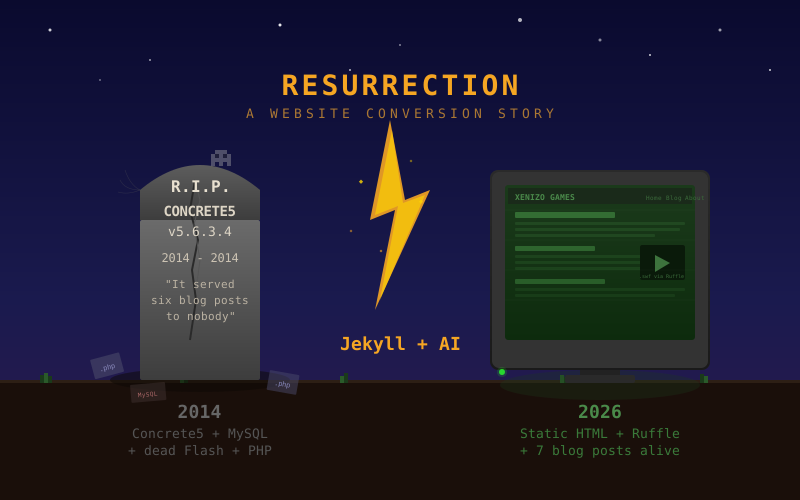
The original site ran on Concrete5 (version 5.6.3.4, for the morbidly curious), a CMS that was perfectly fine in 2014 but had long since been abandoned by yours truly. The MySQL database was still alive on the server — somehow — faithfully holding onto six blog posts that nobody had read in over a decade. Meanwhile, the actual game page for "All Is Vanity" lived on a completely separate subdomain using a Bootstrap Freelancer theme, because apparently past-me thought running two websites in parallel was a reasonable architectural decision.
Here's what we were working with:
- A Concrete5 CMS install with a dead admin panel and database credentials pointing to a MySQL instance that was still running by sheer inertia
- A static game landing page on allisvanity.net with screenshots, game info, and Flash embeds that hadn't worked since Adobe killed Flash in 2020
- 300MB+ of compiled HaXe/OpenFL game builds (Flash SWF and HTML5 JS) cluttering up the file system
- Six blog posts trapped in a MySQL database, invisible to the outside world
- A press kit built in PHP that served XML to exactly zero journalists
In other words, a perfectly preserved time capsule of mid-2010s indie game dev web infrastructure. Beautiful in its own way, like finding a woolly mammoth frozen in a glacier. But not exactly functional.
The Plan: Jekyll and Static Files Forever
The rebuild had a few goals. First, ditch the CMS entirely. No more PHP, no more MySQL, no more logging into admin panels to write a paragraph. Second, consolidate everything under one roof — the game page, the blog posts, the about page, all of it. Third, make it dead simple to maintain going forward. Write a Markdown file, push to the server, done.
Jekyll was the obvious choice. It generates static HTML from templates and Markdown files, which is exactly what a shared hosting Apache server wants to serve. No runtime, no database, no attack surface. Just files.
The new site structure is clean enough to make past-me jealous:
- Custom layouts and SCSS — no theme gem dependency, full control
- A projects page with the "All Is Vanity" game content extracted from the old landing page and press kit
- An about page pulled from the old Concrete5 data
- All six original blog posts rescued from the database
- The whole thing deployable by uploading the
_site/folder via FTP
Extracting Blog Posts from a Concrete5 Database
This was the fun part. And by fun I mean the kind of fun where you're reading SQL dumps at 4 PM on a Saturday.
Concrete5 stores page content as "blocks" in the database, not as flat files. Blog post HTML lives in a table called btContentLocal, but you can't just grab it — you need to cross-reference CollectionVersions (for titles, dates, and slugs), CollectionVersionBlocks (for mapping pages to blocks), and the CollectionVersionBlocksOutputCache (which mercifully contains pre-rendered HTML).
The output cache turned out to be the goldmine. Each blog post's final rendered HTML was sitting right there, complete with all the template chrome from the old Concrete5 theme. A Ruby script stripped out the navigation headers, social sharing buttons, tag lists, and author bios, leaving just the article content. Six blog posts, extracted and converted to Jekyll posts in about 30 seconds.
The sitemap from the old site confirmed what we were looking for:
- Hello, stranger! — the inaugural post about our company name
- Extending the StableXUI library - Grid Widget — custom OpenFL UI work
- What's old is new again: Explaining our logo — Sumerian cuneiform, naturally
- Creating a Simple Particle Generator for Barrage — bullet pattern scripting
- Particles + Physics = Particle Physics? — merging Nape and Barrage
- Nape and Barrage Integration for Bullet Collision and Ricochet — the conclusion of the physics saga
All present and accounted for. Even the image assets — screenshots, flowcharts, thumbnails — were recovered from git history where the original file uploads had been committed years ago.
The Flash Problem (and a WebAssembly Solution)
Four of the six blog posts contained interactive Flash demos. Bullet pattern simulations, physics engine visualizations, UI grid widgets — the kind of stuff that was genuinely cool in 2014 and genuinely broken after Adobe deprecated Flash in 2020.
Converting interactive SWFs to GIFs would have been like converting a sports car into a photograph of a sports car. Technically preserves the visual, misses the entire point. These demos were meant to be clicked, dragged, and played with.
Enter Ruffle, a Flash Player emulator written in Rust and compiled to WebAssembly. One <script> tag in the page header and Ruffle automatically detects <object> Flash embeds and replaces them with its own player. Eight SWF files — Barrage bullet pattern demos, Nape physics simulations, StableXUI grid widgets — all running again in a modern browser without a Flash plugin in sight.
The Flash demos still require the original SWF files, which were also extracted from git history and dropped into assets/swf/. Ruffle handles the rest. It's one of those rare open source projects where you add a single dependency and a decade-old problem just evaporates.
The AI in the Room
I'd be lying if I didn't mention the elephant — or rather, the artificial intelligence — in the room. This entire migration was done with Claude Code, Anthropic's CLI tool for working with codebases. The AI read the old site structure, identified what was worth keeping, wrote the Jekyll scaffolding, extracted content from the SQL dump, fixed broken links, and even remembered to strip out the dead Embedly scripts and stray </param> tags that the old CMS left behind.
Did it get everything right on the first try? Of course not. It initially tried to use the Minima theme gem while also writing fully custom layouts, which is like wearing a belt and suspenders and also stapling your pants to your shirt. But it caught the conflict and fixed it before it caused problems. That's more self-awareness than I exhibited during most of 2014.
The blog post extraction was particularly impressive — mapping Concrete5's block-based content model, cross-referencing database tables, and producing clean Jekyll post files with proper front matter. Would I have figured it out manually? Sure. Would it have taken a Saturday afternoon instead of a Saturday half-hour? Absolutely.
Working with Claude: By the Numbers
The entire migration was done with Claude Code running Opus 4.6 across 4 sessions. Here are the real numbers from the conversation transcripts:
| Metric | Value |
| Human prompts | 44 across 4 sessions |
| AI responses | 381 |
| Tool calls | 350 (118 shell commands, 68 file reads, 37 file writes, 20 edits) |
| Output tokens generated | 96,909 |
| Cache-served input tokens | 32.8M |
| Total tokens processed | ~33.6M |
| Active processing time | ~61 minutes |
| Sub-agents spawned | 14 (parallel blog post and comic conversion tasks) |
| Self-corrections | 4 (theme gem conflict, SCSS @import deprecation, SQL escapes, stray </param> tags) |
| Blog posts recovered | 6 from Concrete5 MySQL + 1 new (this one) |
| Flash SWFs resurrected | 8 files via Ruffle WebAssembly |
| PHP files deleted | All of them. Every last one. |
Three of those forty-four prompts were essentially discovery — "hey, did you know there were blog posts in a database?" followed by "here's the database" followed by "here are the images and Flash files too." The actual build-from-plan step was a single message. If the full context had been provided upfront — the SQL dump, the knowledge that SWFs existed in git history, and the desire to preserve interactive Flash content — this probably could have been a two-message conversation: "here's everything, build it" and "write a blog post about it."
The 32.8M cache-read tokens look wild, but that's how Claude Code works — each turn re-reads conversation history from cache at a fraction of the cost of fresh tokens. The actual "new thinking" was under 100K output tokens. The cache is what lets a multi-session project with 350 tool calls stay coherent.
Lessons for Next Time (a.k.a. Dear Future Me)
If you're reading this because you have another decade-old website to resurrect, here's what to hand the AI on a silver platter from the start:
- The database dump. Don't make the AI guess that content lives in a database. Just export it and drop it in the repo. The Concrete5
CollectionVersionBlocksOutputCachetable was the goldmine — if you know that going in, the extraction is trivial. - A manifest of binary assets. Images, SWFs, fonts, whatever. "These exist in git history at commit X" saves a round trip of archaeology.
- Your hosting constraints. Shared Apache hosting? Say so. No Ruby installed? Say so. No Python? Say so. Environment surprises eat time.
- A style guide for new content. "Match the tone of my existing posts" worked, but "conversational, self-deprecating, technical but accessible, always end with What's Next" would have been faster.
- The full URL structure of the old site. Knowing the old permalink pattern (
/blog/YYYY/MM/slug/) upfront means redirects and internal links can be planned from the start instead of discovered mid-flight.
The meta-lesson is that AI is fast at execution but still needs the same context a human contractor would need. The difference is a human would ask twenty questions in a requirements meeting. The AI asks three questions spread across the conversation, which feels efficient until you realize the answers were sitting in files you could have just handed over at the beginning.
What's Next?
This site is now a clean foundation. The immediate plan is to consolidate content from a few other old personal websites — some ancient PHP sites, some comic strips, some articles from a different era — into this blog over the coming weeks. The _posts/ directory is hungry and the backlog is deep.
At the very least, the website is no longer a cautionary tale about abandoned CMS installs. The old game projects and side work now have a proper home again.
And to anyone else sitting on a decade-old website that's collecting digital dust: it's never too late to hit the reset button. The tools are better, the process is simpler, and if you're lucky, your old database is still running on the server, patiently waiting for someone to come back and read what's inside.
Welcome back, stranger.
(Updated: )